
Memory Management
Nexent’s intelligent memory system gives agents persistent context. With multi-level memories, agents can remember key facts across conversations, retrieve them automatically, and deliver more personalized answers.
🎯 What the Memory System Does
The memory system lets agents “remember” important information and reuse it later without you repeating yourself.
Core Benefits
- Cross-conversation memory – Agents keep track of important facts from earlier chats.
- Automatic retrieval – Relevant memories are pulled in automatically.
- Personalized service – Responses adapt to user preferences and habits.
- Knowledge accumulation – Agents keep getting smarter the more you use them.
⚙️ System Configuration
Access Memory Management
- Click Memory Management in the left navigation.
- Open the System Configuration section.
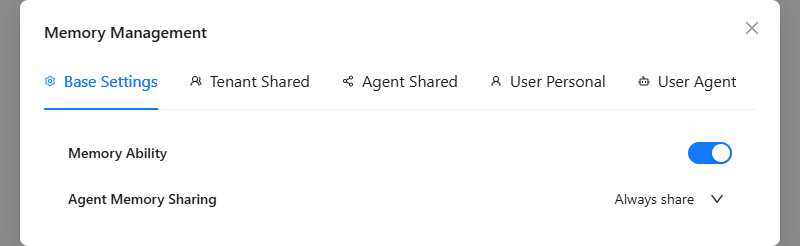
Base Settings
| Setting | Options | Default | Description |
|---|---|---|---|
| Memory Service Status | Enable / Disable | Enable | Controls whether the memory system runs. |
| Agent Memory Sharing Strategy | Always Share / Ask Every Time / Never Share | Always Share | Defines if agents can share memories without user confirmation. |
Setting Tips
- Memory service status – Disable it if you want a completely stateless experience; enable it to unlock all memory features.
- Sharing strategy
- Always Share – Agents exchange memories automatically.
- Ask Every Time – You approve each sharing request.
- Never Share – Agents stay isolated.
📚 Memory Levels
Nexent uses four storage levels so you can keep global knowledge and private facts separate.
Tenant-Level
- Scope: Entire organization, shared by all users and agents.
- Stores: SOPs, compliance policies, org charts, long-term facts.
- Best for: Company-wide knowledge and governance.
- Managed by: Tenant administrators.
Agent-Level
- Scope: A specific agent, shared by everyone using it.
- Stores: Domain knowledge, skill templates, historical summaries.
- Best for: Letting an agent accumulate expertise over time.
- Managed by: Tenant administrators.
User-Level
- Scope: A single user account.
- Stores: Personal preferences, habits, favorite commands, personal info.
- Best for: Tailoring the platform to a specific user.
- Managed by: That user.
User-Agent Level
- Scope: A specific agent used by a specific user (most granular).
- Stores: Collaboration history, personal facts, task context.
- Best for: Deep personalization and long-running projects.
- Managed by: That user.
Retrieval Priority
When an agent retrieves memory it follows this order (high ➝ low):
- Tenant Level – shared facts and policies.
- User-Agent Level – very specific context for that pairing.
- User Level – general personal preferences.
- Agent Level – the agent’s professional knowledge.
🤖 Automated Memory Management
The system takes care of most work for you:
- Smart extraction: Detects key facts in conversations, creates memory entries automatically, and stores them at the right level—no manual input needed.
- Automatic context embedding: Retrieves the most relevant memories and implicitly injects them into the conversation context so agents respond with better accuracy.
- Incremental updates: Gradually refreshes or removes outdated memories to keep the store clean, timely, and reliable.
✋ Manual Memory Operations
Need full control? Manage entries manually.
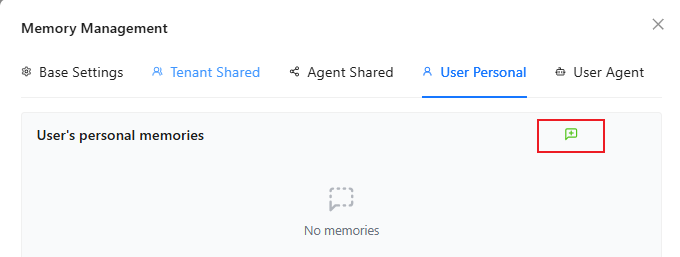
Add a Memory
- Choose the level (tenant / agent / user / user-agent) and target agent.
- Click the green + button.
- Enter up to 500 characters describing the fact.
- Click the check mark to save.
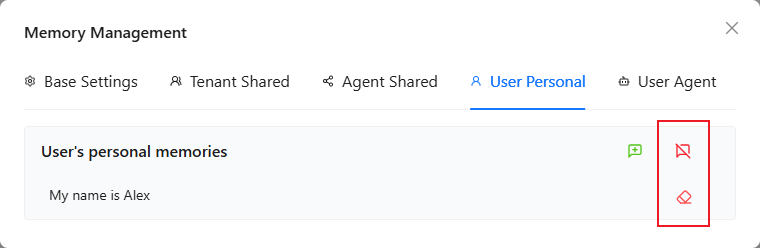
Delete Memories
- Delete group: Click the red ✕ icon to remove every entry under that agent group (confirm in the dialog).
- Delete single entry: Click the red eraser icon to remove one entry.
💡 Usage Tips
Memory Content Guidelines
- Keep entries atomic: Each memory should contain one clear fact.
- ✅ Good: “The user prefers dark mode.”
- ❌ Not good: “The user prefers dark mode, works nights, and loves coffee.”
- Maintain freshness: Review and remove outdated entries regularly.
- Protect privacy: Store sensitive info at the user or user-agent level instead of tenant level.
Best Practices
- Pick the memory level that matches the sharing needs.
- Let automation handle routine facts; manually add critical knowledge.
- Review the memory list periodically to keep everything relevant.
- Keep personal or sensitive data scoped tightly to the right user.
🚀 Next Steps
With memory configured you can:
- Experience the new continuity in Start Chat.
- Manage all agents in Agent Space.
- Build more agents inside Agent Development.
Need help? Check the FAQ or open a thread in GitHub Discussions.