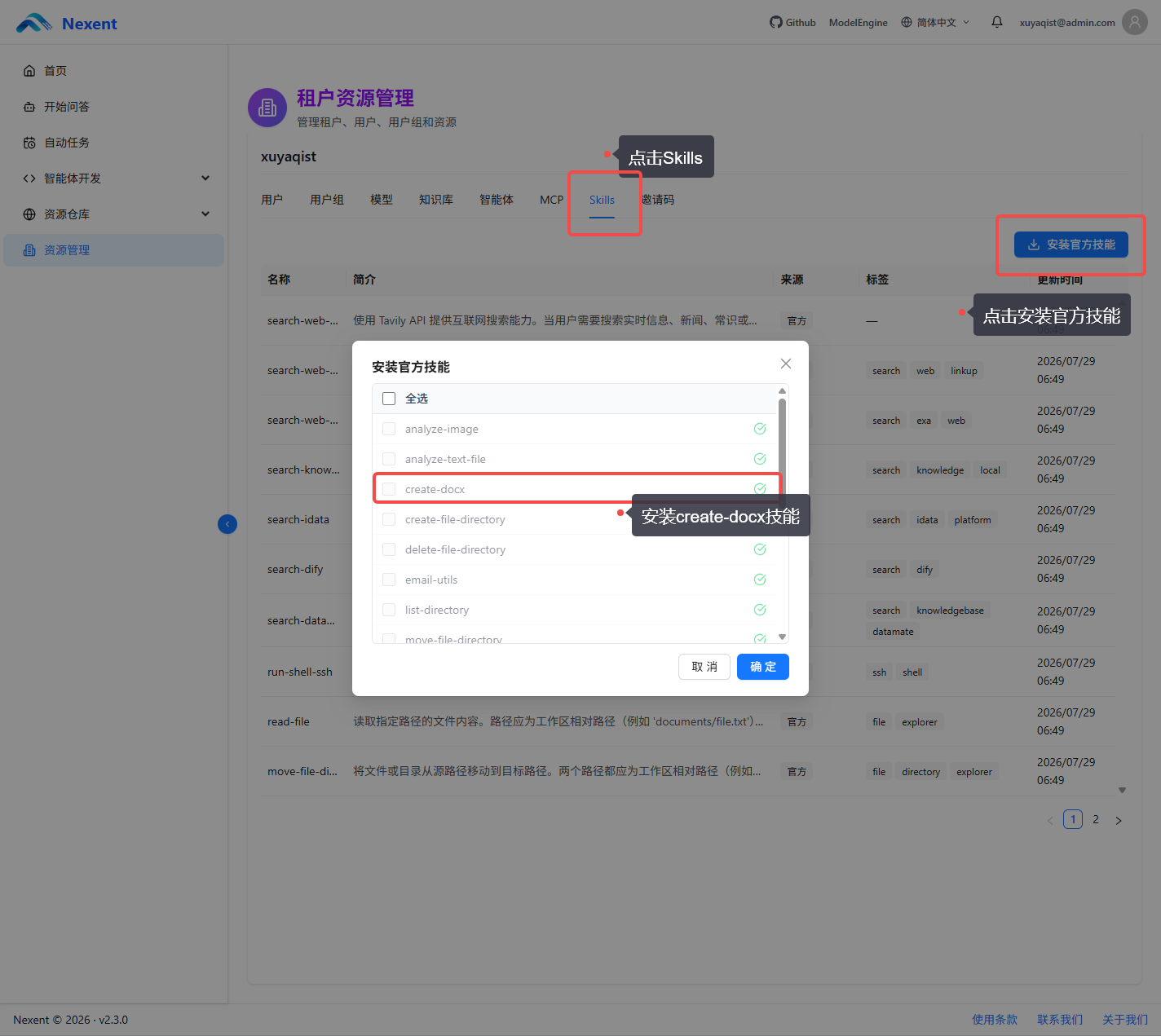
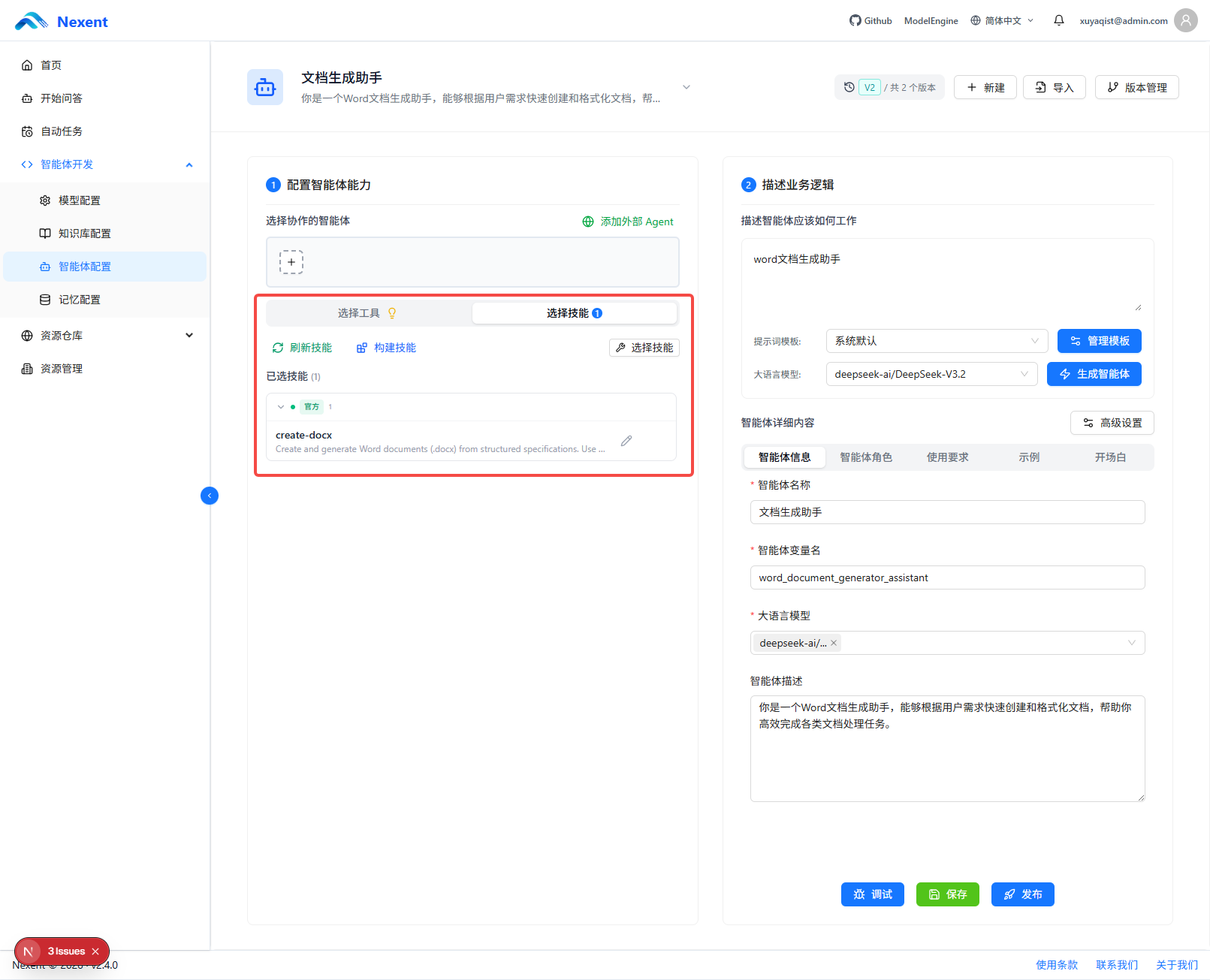
create-docx 官方技能
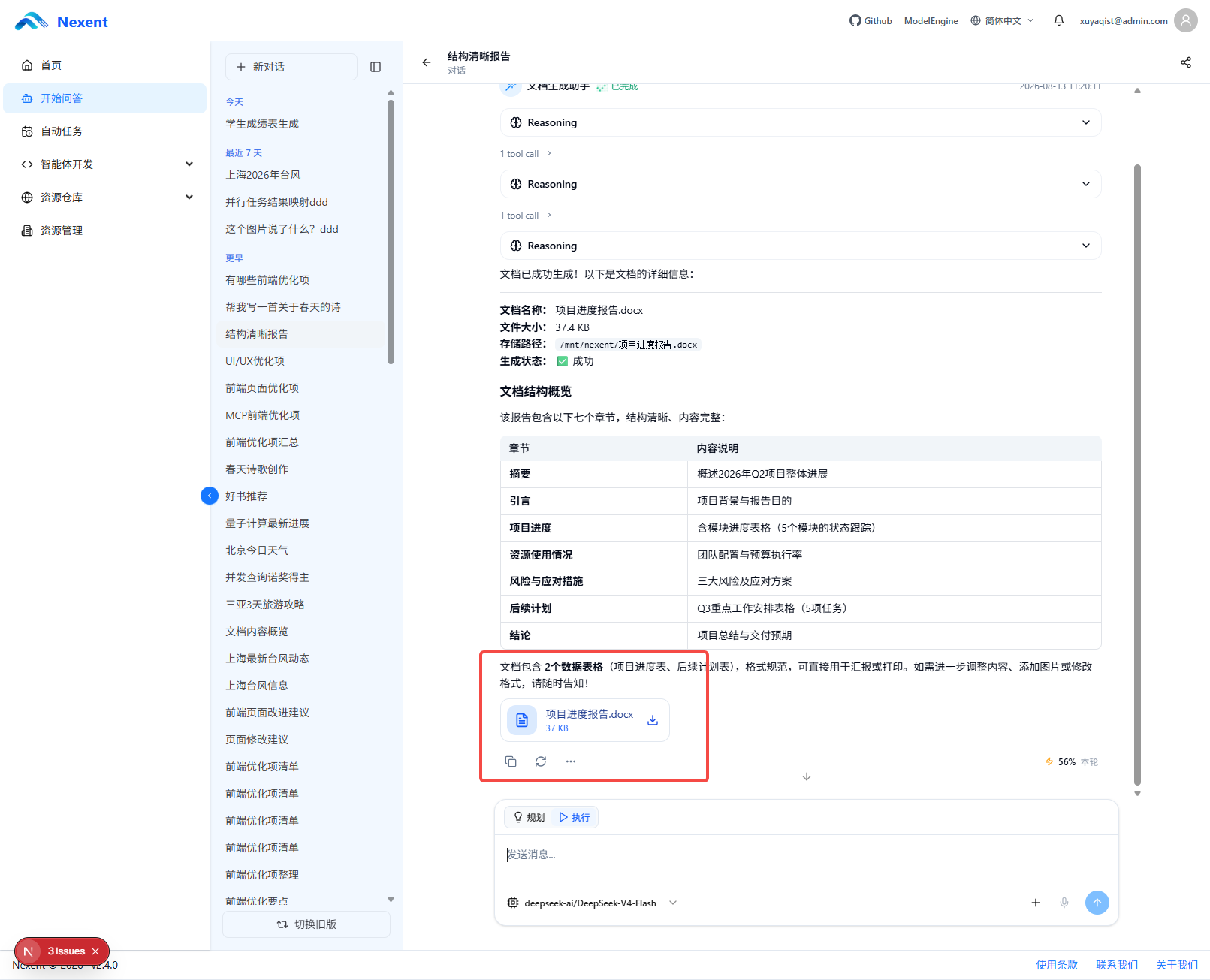
create-docx 是 official-skills-zip 提供的官方文件生成技能,用于根据结构化需求创建或编辑 Word 文档。智能体可以根据用户提供的主题、内容和格式要求调用该技能,生成 .docx 文件并将结果作为 Nexent artifact 推送到对话前端,同时保存到会话历史。
使用 create-docx
在智能体中启用 create-docx 后,用户可以直接提出创建或编辑 Word 文档的需求,例如生成报告、方案、通知、会议纪要或其他结构化文档。技能会负责执行文档生成脚本,并返回可下载的文件产物。
具体的脚本参数、支持的文档能力和运行约束以 create-docx 技能包中的 SKILL.md 为准。
自定义文件生成 Skill 开发指南
以下内容面向编写自定义 Skill 的开发者。按照本文约定声明并实现脚本后,Skill 生成的文件会作为 Nexent artifact 被上传、以附件形式推送到对话前端,并保存到会话历史。
本文以 create-docx 为示例,介绍如何为文件生成脚本声明输出类型、返回结构化 artifact,以及排查文件未能作为附件发布的问题。
适用场景
适用于生成或导出可交付文件的 Skill,例如:
- Word 文档、PDF、表格和演示文稿
- 图片、音频、视频和压缩包
- 代码、配置文件、数据集和报告
如果脚本只执行分析、修改工作区中的中间文件,或返回文本结果,则不要将其声明为文件生成脚本。
工作原理
文件从生成到前端显示经过以下步骤:
- 在
SKILL.md的script_outputs中声明允许产出文件的脚本、artifact 类型和 MIME 类型。 - 智能体通过
run_skill_script执行该脚本。 - 脚本生成文件并返回成功 JSON,其中包含
artifacts数组。 - Nexent SDK 检查脚本是否已声明、artifact 是否完整、文件是否存在、文件大小是否一致、MIME 类型是否已声明。
- 校验通过的 artifact 以
skill_artifact结构化事件发布。 - 后端只接收该结构化事件,检查文件路径是否允许上传后上传到对象存储。
- 后端发送
skill_files流事件并写入会话附件;前端按 MIME 类型和文件名渲染下载或预览入口。
普通文本、执行日志和脚本标准输出中的 JSON 不会被扫描或转换为文件附件。未发送 skill_artifact 的脚本结果不会出现在前端附件区。
技能包结构
应以 ZIP 包上传包含脚本的 Skill。推荐结构如下:
report-generator/
├── SKILL.md
├── scripts/
│ ├── generate_report.py
│ └── publish_report.py
├── requirements.txt
└── examples.mdSKILL.md 位于技能根目录。script_outputs 中的路径相对技能根目录,统一使用正斜杠,例如 scripts/generate_report.py。
在 Frontmatter 中声明文件脚本
文件生成能力由 script_outputs 声明。键是脚本相对路径,值定义该脚本可发布的 artifact 类型和 MIME 类型。
---
name: create-docx
description: Create and generate Word documents from structured specifications. Use when users need a new Word document or an edited Word document.
script_outputs:
scripts/generate_docx.py:
kind: file
mime_types:
- application/vnd.openxmlformats-officedocument.wordprocessingml.document
scripts/get_document_path.py:
kind: file
mime_types:
- application/vnd.openxmlformats-officedocument.wordprocessingml.document
---script_outputs 字段
| 字段 | 必填 | 说明 |
|---|---|---|
| 脚本路径 | 是 | 相对 Skill 根目录的路径。执行时必须与 run_skill_script 传入的路径匹配。 |
kind | 是 | 文件交付固定填写为 file。其他值不会生成文件 artifact。 |
mime_types | 建议必填 | 该脚本允许发布的 MIME 类型列表。运行时 artifact 的 mime_type 必须在此列表中。 |
同一脚本可声明多个 MIME 类型,例如同时支持 CSV 与 XLSX:
script_outputs:
scripts/export_data.py:
kind: file
mime_types:
- text/csv
- application/vnd.openxmlformats-officedocument.spreadsheetml.sheet路径匹配规则
声明路径和调用路径在比较前会去除开头的 ./ 并统一为正斜杠。因此下面两种调用都能匹配 scripts/generate_report.py:
run_skill_script("report-generator", "scripts/generate_report.py", params="--output report.pdf")
run_skill_script("report-generator", "./scripts/generate_report.py", params="--output report.pdf")仍建议在 SKILL.md 正文和智能体调用示例中始终写 scripts/...,避免文档与声明不一致。
脚本返回契约
已声明的文件生成脚本必须在成功时输出一个 JSON 对象。顶层 status 必须是 success,文件放在 artifacts 数组中。
{
"status": "success",
"artifacts": [
{
"kind": "file",
"absolute_path": "/mnt/nexent/output/monthly-report.docx",
"file_name": "monthly-report.docx",
"mime_type": "application/vnd.openxmlformats-officedocument.wordprocessingml.document",
"file_size_bytes": 12800
}
]
}顶层字段
| 字段 | 必填 | 要求 |
|---|---|---|
status | 是 | 必须为字符串 success。其他值不会发布 artifact。 |
artifacts | 是 | 必须为数组,可包含一个或多个文件 artifact。 |
可在顶层添加供模型阅读的 message、file_path 等字段,但这些字段不参与附件发布。文件附件只读取 artifacts。
单个 artifact 字段
| 字段 | 必填 | 要求 |
|---|---|---|
kind | 是 | 固定为字符串 file。 |
absolute_path | 是 | 已生成文件的绝对路径。必须位于 Nexent 允许上传的工作目录。 |
file_name | 是 | 前端显示与下载使用的文件名,不能是空字符串。 |
mime_type | 是 | 文件真实 MIME 类型,必须符合该脚本的 mime_types 声明。 |
file_size_bytes | 是 | 非负整数,必须等于 absolute_path 指向文件的实际字节大小。 |
file_size_bytes 不能是布尔值、字符串或估算值。SDK 会在发布前读取磁盘文件大小并进行精确比较。
Python 脚本示例
以下示例创建一个文本报告,并打印符合契约的 JSON。实际文件格式应使用对应的生成库。
from __future__ import annotations
import json
from pathlib import Path
MIME_TYPE = "text/plain"
def main() -> None:
output_path = Path("/mnt/nexent/output/summary.txt")
output_path.parent.mkdir(parents=True, exist_ok=True)
output_path.write_text("Generated report\n", encoding="utf-8")
print(json.dumps({
"status": "success",
"artifacts": [{
"kind": "file",
"absolute_path": str(output_path.resolve()),
"file_name": output_path.name,
"mime_type": MIME_TYPE,
"file_size_bytes": output_path.stat().st_size,
}],
}))
if __name__ == "__main__":
main()相应的 SKILL.md 必须包含:
script_outputs:
scripts/generate_summary.py:
kind: file
mime_types:
- text/plain在 SKILL.md 正文中指导智能体
Frontmatter 声明用于运行时校验;正文用于告诉智能体何时调用脚本和如何处理返回值。文件生成脚本应在正文中明确以下要求:
## Generate a report
Use `scripts/generate_report.py` to create the final report.
1. Pass the requested output name through `params`.
2. Wait for the script to return a successful JSON result.
3. Return the script result without rewriting its `artifacts` field.
4. Do not use editing scripts as the final publishing step.若 Skill 包含编辑脚本和最终导出脚本,只声明最终导出脚本为 kind: file。编辑脚本可以修改工作文件,但不应产生附件;完成编辑后调用已声明的导出或发布脚本。
MIME 类型建议
声明应使用标准 MIME 类型,而不是文件扩展名。常见值如下:
| 文件类型 | MIME 类型 |
|---|---|
application/pdf | |
| DOCX | application/vnd.openxmlformats-officedocument.wordprocessingml.document |
| XLSX | application/vnd.openxmlformats-officedocument.spreadsheetml.sheet |
| PPTX | application/vnd.openxmlformats-officedocument.presentationml.presentation |
| CSV | text/csv |
| JSON | application/json |
| ZIP | application/zip |
| PNG | image/png |
| JPEG | image/jpeg |
| Markdown | text/markdown |
| Plain text | text/plain |
前端会结合 mime_type 与文件扩展名选择附件图标、下载和预览行为。确保扩展名、实际文件内容及 mime_type 三者一致。
失败条件与排查
下列情况会使文件不会作为附件发布:
| 问题 | 结果 | 处理方式 |
|---|---|---|
脚本未在 script_outputs 中声明 | SDK 不发布 artifact | 添加完全匹配的脚本路径及 kind: file。 |
kind 不是 file | SDK 忽略 artifact | 将脚本声明和 artifact 字段都设为 file。 |
status 不是 success | SDK 忽略 artifact | 仅在文件成功写入后返回成功状态。 |
| 缺少必填 artifact 字段 | SDK 忽略该 artifact | 返回完整的五个字段。 |
| 文件不存在 | SDK 忽略 artifact | 在输出 JSON 前确认文件已写入。 |
| 文件大小不匹配 | SDK 忽略 artifact | 使用实际 stat().st_size 填充字段。 |
| MIME 未声明 | SDK 忽略 artifact | 将实际 MIME 加入该脚本的 mime_types。 |
| 路径不允许上传 | 后端拒绝上传 | 把输出写入 Nexent 允许的工作目录。 |
| 仅打印路径或日志 JSON | 不会生成附件 | 返回完整 artifacts 数组,不依赖文本解析。 |
发布前检查清单
- [ ]
SKILL.md使用script_outputs,不使用 Skill 级旧输出字段。 - [ ] 每个可交付文件的脚本路径都已声明为
kind: file。 - [ ] 每个脚本的
mime_types包含所有实际可能输出的 MIME 类型。 - [ ] 脚本仅在文件写入完成后输出
status: success。 - [ ] 每个 artifact 含
kind、absolute_path、file_name、mime_type、file_size_bytes。 - [ ]
file_size_bytes与磁盘实际大小完全一致。 - [ ] 输出路径位于运行环境允许上传的目录。
- [ ] 使用真实对话验证前端能收到并显示附件。