
Add External A2A Agents
Nexent supports integrating third-party Agents through the A2A (Agent-to-Agent) protocol, letting agents from different platforms work together. This page explains how to add and manage external A2A agents.
🤝 Sources of Collaborative Agents
In Agent Development → Collaborative Agents, you can add two kinds of collaborative agents:
- Internal Agents: agents published on the platform
- External A2A Agents: third-party agents discovered through the A2A protocol
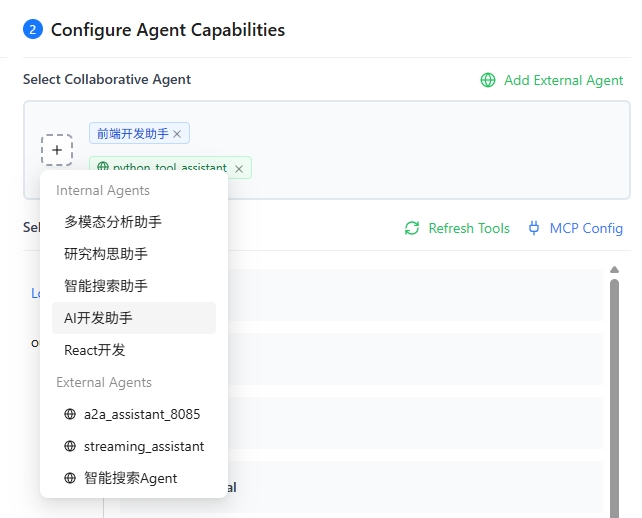
🌐 Add External A2A Agents
Nexent provides two ways to discover external A2A agents: URL discovery and Nacos discovery.
Discover Agent via URL
If you know the Agent Card address of the target agent, use the URL discovery method.
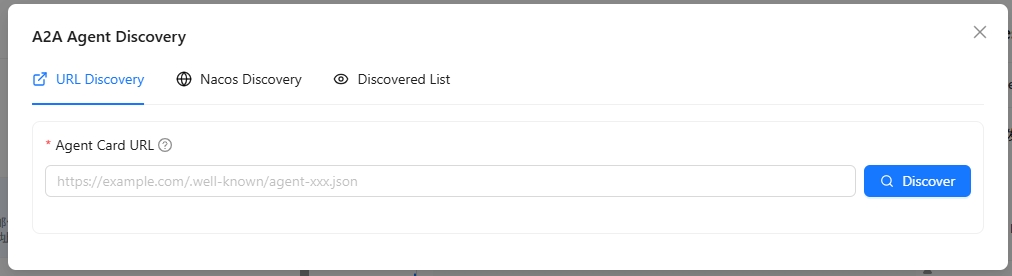
- In the Collaborative Agents tab, click Add External Agent
- Select the URL Discovery tab
- Fill in the Agent Card URL, for example:
https://example.com/.well-known/agent.json - If the Agent Card requires authentication, fill in a JSON object in Custom Request Headers, for example:
{"Authorization": "Bearer <token>"} - Click Discover; the system automatically fetches the agent's information
- After a successful discovery, review the agent's name, description, and capabilities
- Click Add to List to finish adding the agent
💡 Tip: Custom request headers are saved with the external agent and used only for retrieving and refreshing the Agent Card. They are never used for subsequent agent calls. When rediscovering the same URL, leave the field empty to keep the current configuration; enter
{}to clear it.
💡 Tip: The Agent Card is an A2A 1.0–compliant description file containing the agent's name, description, calling address, and capabilities.
Discover Agent via Nacos
If your agents are registered in the Nacos service discovery platform, use Nacos discovery to integrate them in batches.
- In the Collaborative Agents tab, click Add External Agent
- Select the Nacos Discovery tab
- On first use, configure the Nacos connection info:
- Nacos Server Address: e.g.
http://127.0.0.1:8848 - Namespace ID: optional
- Group Name: default
DEFAULT_GROUP - Username/Password: optional
- Nacos Server Address: e.g.
- Click Save Configuration to save the Nacos connection info
- Fill in the agent service name to scan
- Click Scan; the system fetches matching agent info from Nacos
- Pick the agents you need from the scan results to add them to the list
⚠️ Note: Make sure Nacos is running and the target agents are correctly registered.
🛠️ Manage Discovered External Agents
In the External A2A Agent list you can view and manage every discovered agent:
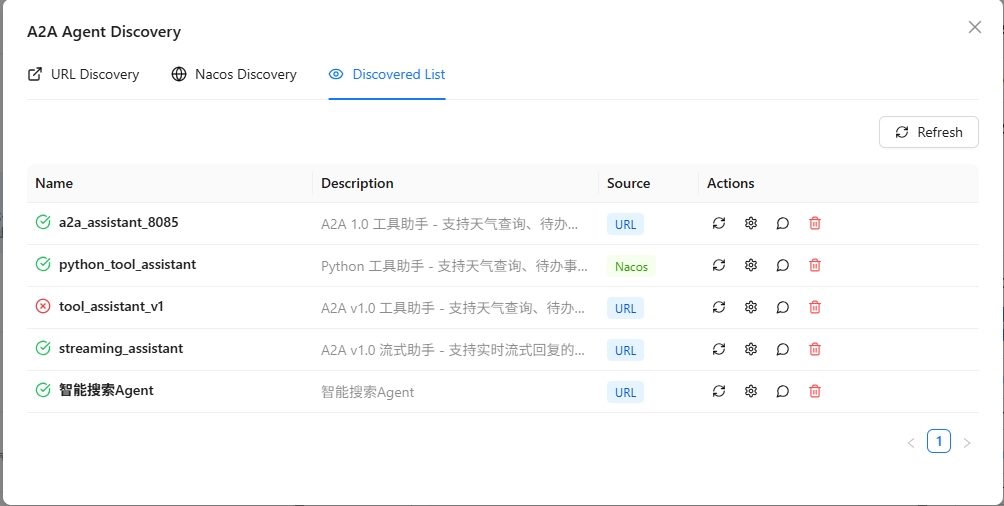
- View Agent Details: click the agent card to see the full info: name, description, URL, capability list, etc.
- Test Agent: click Test to send a test message and verify the agent works
- Chat with Agent: click Chat to open a chat window and interact in real time
- Configure Call Protocol: click Protocol Configuration to choose how to call this agent:
- HTTP + JSON: REST-style calls
- JSON-RPC: JSON-RPC 2.0 calls
- Configure Authentication: if the Agent Card declares
securitySchemesandsecurityRequirements, click Agent Authentication and fill in the required values. Nexent places each value in the header, query parameter, or cookie specified by the Card; all fields in the same requirement must be configured together. - Refresh Agent Information: click Refresh to re-fetch the latest Agent Card after the agent's info changes
- Remove Agent: click Remove to delete the agent from the discovered list
💡 Use cases:
- Use URL discovery to quickly integrate a known third-party agent service
- Use Nacos discovery to bulk-integrate all agents from the same registry
- Configure protocols to meet different agent vendors' requirements
🔌 Integrate DataAgent via URL
DataAgent is an agent platform that supports the A2A protocol. The following steps show how to integrate it with Nexent:
Start DataAgent in A2A service mode by following the DataAgent documentation
Nexent does not currently support agents that require authentication. Do not set
auth-tokenwhen starting DataAgent.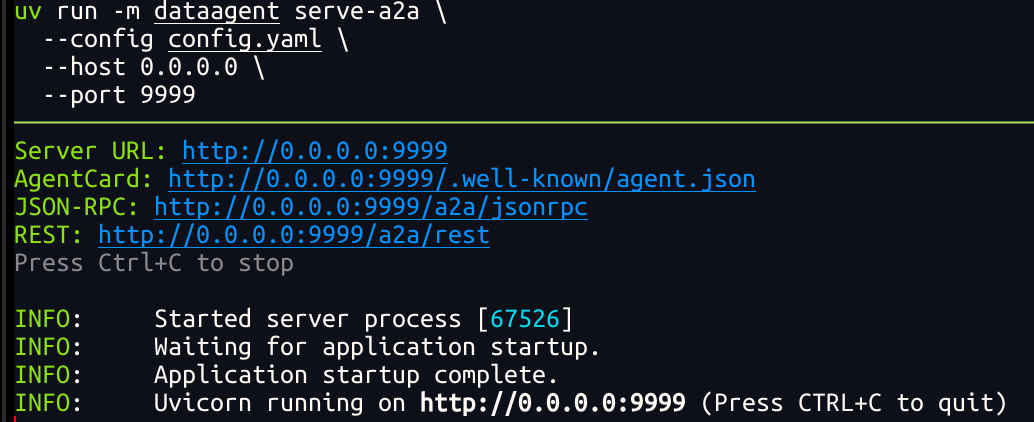
In Nexent, choose URL Discovery, fill in
http://<IP>:9999/.well-known/agent-card.json, and click DiscoverOnce discovered, set the Protocol Configuration to HTTP + JSON to start using the agent